How to Install uv on Debian: The Fast Python Package Manager
uv is an extremely fast Python package and project manager written in Rust by Astral, the creators of Ruff. It’s designed to be a single tool that replaces pip, pip-tools, pipx, poetry, pyenv, twine, virtualenv, and more, while being 10-100x faster than traditional Python package managers.
While uv is gaining rapid adoption in the Python community for its incredible performance and comprehensive feature set, installing it on Debian systems requires some extra steps since it’s not available in the official Debian repositories yet.
Fortunately, there’s an easy solution: the unofficial debian.griffo.io repository provides pre-built Debian packages for uv and many other useful development tools.
What Makes uv Special?
Before diving into the installation, let’s understand why uv is revolutionizing Python package management:
- 🚀 Single tool replacement - Replaces multiple Python tools with one unified interface
- ⚡️ Incredible speed - 10-100x faster than pip thanks to Rust implementation
- 🗂️ Comprehensive project management - Universal lockfiles, workspaces, and dependency resolution
- ❇️ Script execution - Run Python scripts with inline dependency metadata
- 🐍 Python version management - Install and manage multiple Python versions
- 🛠️ Tool management - Install and run Python-based CLI tools like pipx
- 🔩 pip-compatible interface - Drop-in replacement for existing workflows
- 💾 Disk-space efficient - Global cache for dependency deduplication
Why Use debian.griffo.io?
The debian.griffo.io repository offers several advantages over manual installation:
- Easy installation and updates through APT package manager
- Automatic dependency management handled by Debian packaging
- Consistent with Debian packaging standards
- Supports multiple Debian distributions (Bookworm, Trixie, Sid)
- Regular updates following uv’s release cycle
- No need to compile from source or manage Rust toolchain
Prerequisites
Before we begin, make sure you have:
- A Debian-based system (Bookworm, Trixie, or Sid)
sudoprivilegescurlinstalled (install withsudo apt install curlif needed)
Step 1: Add the Repository
First, we need to add the GPG key and repository to your system. Run the following commands in your terminal:
# Add the GPG key
curl -sS https://debian.griffo.io/EA0F721D231FDD3A0A17B9AC7808B4DD62C41256.asc | sudo gpg --dearmor --yes -o /etc/apt/trusted.gpg.d/debian.griffo.io.gpg

# Add the repository
echo "deb https://debian.griffo.io/apt $(lsb_release -sc 2>/dev/null) main" | sudo tee /etc/apt/sources.list.d/debian.griffo.io.list
Let’s break down what these commands do:
- GPG Key Addition: Downloads and installs the repository’s GPG key, ensuring package authenticity
- Repository Addition: Adds the repository URL to your APT sources list, automatically detecting your Debian distribution
Step 2: Update Package Lists
After adding the repository, update your package lists:
sudo apt update
Step 3: Install uv
Now you can install uv using APT:
sudo apt install uv
This command will download and install the latest version of uv along with any required dependencies.
Step 4: Verify Installation
After installation, verify that uv is working correctly:
uv --version
You should see output similar to:
uv 0.8.3
You can also check the help to see all available commands:
uv --help
Getting Started with uv
Now that uv is installed, let’s explore some of its key features:
Project Management
Create a new Python project:
# Initialize a new project
uv init my-project
cd my-project

# Add dependencies
uv add requests numpy

# Run your project
uv run python main.py

# Create a lockfile
uv lock

# Sync dependencies
uv sync
Script Execution
uv can run Python scripts with inline dependencies:
# Create a script with inline dependencies
echo 'import requests; print(requests.get("https://httpbin.org/json").json())' > script.py
uv add --script script.py requests

# Run the script in an isolated environment
uv run script.py
Tool Management
Install and run Python tools:
# Run a tool temporarily
uvx cowsay "Hello from uv!"

# Install a tool globally
uv tool install black
black --version

# List installed tools
uv tool list
Python Version Management
uv can install and manage Python versions:
# Install Python versions
uv python install 3.11 3.12

# List available Python versions
uv python list

# Use a specific Python version
uv python pin 3.12
pip Interface
uv provides a drop-in replacement for pip commands:
# Create a virtual environment
uv venv

# Install packages (pip-compatible)
uv pip install django flask

# Generate requirements
uv pip compile requirements.in

# Sync requirements
uv pip sync requirements.txt
Updating uv
One of the biggest advantages of using the repository is easy updates. To update uv (and all other packages):
sudo apt update && sudo apt upgrade
uv can also update itself if installed via other methods:
uv self update
Other Available Packages
The debian.griffo.io repository doesn’t just provide uv. It also includes many other useful development tools:
- zig: Modern systems programming language (installation guide)
- eza: Modern ls replacement (installation guide)
- fzf: Command-line fuzzy finder (installation guide)
- lazydocker: Terminal UI for Docker
- lazygit: Terminal UI for Git
- yazi: Terminal file manager written in Rust
- ghostty: Fast terminal emulator
- And many more!
You can explore all available packages by browsing the repository at debian.griffo.io. If you’re interested in other development tools, check out our guides on How to Install Zig on Debian for systems programming, How to Install Updated eza on Debian for a modern ls replacement, and How to Install Updated fzf on Debian for powerful fuzzy finding, all using the same repository and installation process.
Troubleshooting
Repository Key Issues
If you encounter GPG key issues, make sure you’re using the correct key:
# Remove old key if it exists
sudo rm -f /etc/apt/trusted.gpg.d/debian.griffo.io.gpg

# Add the current key
curl -sS https://debian.griffo.io/EA0F721D231FDD3A0A17B9AC7808B4DD62C41256.asc | sudo gpg --dearmor --yes -o /etc/apt/trusted.gpg.d/debian.griffo.io.gpg
Package Not Found
If APT can’t find the uv package:
- Ensure you’ve run
sudo apt updateafter adding the repository - Check that your Debian distribution is supported (Bookworm, Trixie, or Sid)
- Verify the repository was added correctly:
cat /etc/apt/sources.list.d/debian.griffo.io.list
Permission Issues
If you encounter permission issues when using uv:
# Check uv installation
which uv
ls -la $(which uv)

# Ensure your user has proper permissions
groups $USER
Uninstalling
If you need to remove uv:
# Remove uv package
sudo apt remove uv

# Remove the repository (optional)
sudo rm /etc/apt/sources.list.d/debian.griffo.io.list
sudo rm /etc/apt/trusted.gpg.d/debian.griffo.io.gpg
sudo apt update
Performance Comparison
To appreciate uv’s speed, here’s a visual comparison of uv against other popular Python package managers:
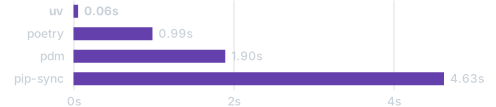
The chart shows uv’s dramatic performance advantage when installing popular packages compared to poetry, pdm, and pip-sync. This speed improvement becomes even more significant with larger dependency trees and complex projects, making uv an excellent choice for both development and CI/CD environments.
Conclusion
Installing uv on Debian doesn’t have to be complicated. The debian.griffo.io repository provides an easy, maintainable way to install and keep uv up-to-date on your Debian system. With uv installed, you get:
- Dramatically faster Python package management
- Unified tooling that replaces multiple Python tools
- Modern project management with lockfiles and workspaces
- Seamless Python version management
- Easy tool installation and execution
Whether you’re a Python developer looking to speed up your workflow, a DevOps engineer managing Python applications, or someone who just wants a better Python package management experience, uv is an excellent choice.
The repository is maintained as an unofficial community project and provides packages that aren’t available in the official Debian repositories. It’s a valuable resource for Debian users who want access to modern development tools without the hassle of manual compilation and installation.
Happy coding with uv!
Resources
- uv Official Website
- uv GitHub Repository
- uv Debian Packages Repository
- debian.griffo.io Repository
- uv Documentation
- Astral (uv creators)
Disclaimer: The debian.griffo.io repository is an unofficial community project and is not affiliated with the official Debian project or Astral.